The remote support methods I have used before to help you with your computers I know going to use less often as the simplyfied processes were still to completecated for some.
I am now using a new very easy way to give you remote support, called TeamViewer, it is FREE of charge to use for our private use.
There is now no need to go through any completecated install setup files, it now just works straight away.
1. Download TeamViewer to your Desktop and run
Windows Download (Windows Download Backup Version) Alt Windows Download (Alt Windows Backup Version)
Mac Download (Mac Download Backup Version)
If that doesn't work download to My Documents and run
Either neither above work, don't save, just run the program
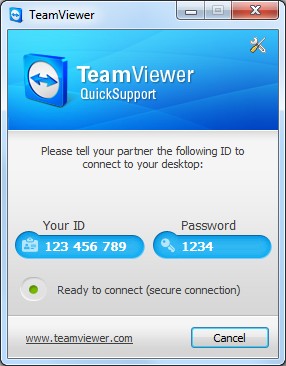
2. Inform me the Your ID and Password that is randomly generated everytime you use TeamViewer Quick Support
Example Image
Linux (only available as TeamViewer 6 Full Version)
Red Hat, Fedora, Suse, Mandriva (32/64-Bit) (Red Hat, Fedora, Suse, Mandriva (32/64-Bit) Backup Version)
Debian, Ubuntu (32-Bit) (Debian, Ubuntu (32-Bit) Backup Version)
Debian, Ubuntu (64-Bit) (Debian, Ubuntu (64-Bit) Backup Version)
(executable files, no installation required) ((executable files, no installation required) Backup Version)
TeamViewer App for Android (Backup Version)
TeamViewer App for iPhone FREE
TeamViewer App for iPad FREE HD